


Many professionals prefer generating trendy logos, as it serves as a visual representation of a brand’s identity in a rapidly evolving digital landscape. By using AI tools to create a well-designed logo, you can convey professionalism while attracting clients. Therefore, this article will provide you with a complete guide on how to create a logo using insMind, a free AI logo generator.
Part 1. What Makes insMind the Best AI Logo Generator?
insMind is marked as one of the best AI logo creators, as it allows users to generate unique logos quickly while catering to various styles and industries. This platform offers a vast library of innovative designs and templates to choose from, helping users modify their logos according to their brand.
Furthermore, with the help of its quick turnaround time you can successfully generate logos by simply feeding in brand name, slogan and information regarding your brand. After generating a logo, professional users can add further edits, like changing the size and background of their logo. With this remarkable AI logo generator, you can efficiently enhance brand recall, making it rememberable among audiences.
Part 2. How Can I Create an AI-generated Logo Using insMind?
Now that you are fully aware that insMind stands out as the best AI logo maker, let’s explore how to utilize this tool. To make attractive logos, follow the guide and effortlessly achieve an eye-appealing logo for your brand.
Step 1. Gain Access to the AI Logo Generator
First, launch the main webpage of AI Logo Generator to start with the process of creating stunning logos for your brand. Then, press the “Get Started for Free” button to proceed further in making compelling logos for free using insMind.


Step 2. Enter the Details and Start Creating the Logo
Next, enter all your brand details including the brand name, slogan and information regarding initiation of brand. After clicking the “Start” button, generate unique logos according to the details you mentioned. Now, select the logo design from the templates and press the “Edit” button to make further edits.


Step 3. Customize and Enhance Your AI Logo
In order to ensure that the generated logo meets your company design, alter further edits within the main editing interface. From here, select the subject and hit the “Color” icon within the “Fill” section available at the right corner of your screen to change color of the logo.


Step 4. Save Your AI-Generated Logo
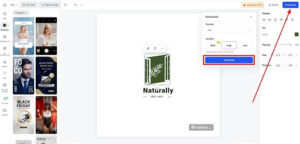
After completing your logo design, which completely defines your brand style, press the “Download” button on the right. Then, choose your image format and image quality settings before tapping the “Download” button to save your stunning brand logo.

Part 3. What Features Make insMind Logo Generator Stand Out?
Moving forward, insMind’s AI logo generator successfully creates a compelling visual identity for your company. So, let’s not wait and quickly explore some additional benefits that insMind offers.
- Modern Design Trends: Users can gain advantages from designs that are influenced by current trends while making your logo seem unique and new.
- Professional Quality: The insMind AI logo generator ensures that your logo is polished and professional-looking, making your brand stand out.
- Cost Effective: With this AI logo creator, you can achieve an expert logo without exceeding your budget, providing you with an exquisite and cost-effective solution.
- Customization Options: You can also utilize a variety of colors and design components to customize your logo to your taste and vision.
Part 4. Exploring the Versatility of insMind With Other Features
In addition to its capability as an AI logo maker, insMind has a number of following tools that can improve your experience with branding and design.
- AI Model: There is no need to hire real-life models or even practice model photography, as its AI model generator seamlessly convert mannequins into real-life models. You can turn your homemade photos into industry level masterpieces while changing the background of your image.

- AI Design: This AI design generator lets you create multiple professional quality designs in no time, by uploading your original photo, entering headings and benefits. Furthermore, you can effortlessly resize your generated design to multiple sizes to ensure it fits across all platforms.
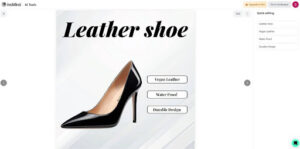

- AI Thumbnail Maker: Its AI-powered thumbnail generator can transform your ideas into eye-catching visuals. Without any skills needed, you can effortlessly generate attractive thumbnails from the tool’s template designs.


- AI Image Generator: insMind facilitates its users by converting text to image using AI assistance and manifesting their vision into reality. This artistic AI image generator lets you pick from a variety of artistic styles, including abstract art and cartoon illustration.


Conclusion
In conclusion, the AI logo generator by insMind is a powerful tool for anyone looking to establish a strong brand identity. This platform is an all-in-one solution for both startups and established enterprises, as it provides tools for developing a consistent brand identity. All in all, insMind offers the resources you need to differentiate yourself from the competition and successfully engage your audience.