


Are you looking for a quality headshot for your profile or a professional portrait for other purposes? The best option would be to create one with AI tools. But there are so many AI programs in the market that finding the best AI headshot generator can be quite a chore.
But worry not! In this guide, I have compiled the top 5 to share with you, along with what I liked and disliked about them. Now let’s dive in to find out the most outstanding AI headshot generator, plus the simplest way to create and customize your headshot in no time.
Comparison of the Best AI Headshot Generators
Do you want to find the most suitable headshot generator for your needs but are short on time? I’ve included the key aspects of the best ones below to help you make an informed decision quickly.
Wondershare Virbo
Pros:
- Generate headshots from text prompts
- Turn selfies into professional headshots
- Diverse image styles, casual and professional
- Fastest headshot generator (takes seconds)
- User-friendly
Cons:
- Limited credits for a free trial
Pricing:
- Free trial
- $19.9/month
- $44.9/year
Rating: 4.8/5
Portrait Pal
Pros:
- Realistic outputs
- Numerous scenes, attire, and lighting levels
- Fast processing speed
Cons:
- No output editing
- Relatively pricey
Pricing:
- Stater plan at $35
- Basic plan at $45
- Premium plan at $75
Rating: 4.5/5
BetterPic
Pros:
- Options for customization
- Quick generation to spare your time
- Easy to use
Cons:
- Unnatural headshot photos sometimes
- Quite pricey
Pricing:
- Basic plan at $35
- Pro plan at $39
- Expert plan at $79
Rating: 4.6/5
Aragon AI
Pros:
- High-quality results
- A variety of outfits and facial expressions
- Easy to master
Cons:
- Require 6 selfies for generation
- Some poses are strange
Pricing:
- Starter at $35
- Basic at $45
- Premium at$75
Rating: 4.5/5
DreamWave AI
Pros:
- Unlimited scenes, hairstyles, and outfits
- Offer AI image editing
- Strict data protection
Cons:
- Reduce facial details sometimes
- A longer time to generate photos
Pricing:
- Stater plan at $35
- Standard plan at $59
- Best Value plan at $99
Rating: 4.4/5
Why Choose Virbo AI Headshot Generator
Designed with cutting-edge technology, Virbo AI Headshot Generator is undoubtedly the best AI professional headshot generator among all the options. This tool turns bland selfies into stunning headshots for various needs, such as social media, business, and marketing. Another highlight is that Virbo can generate a professional headshot from text prompts. All you need is to type in the description of what you want the headshot to look like, and then Virbo will get the rest done.
What I love most about Virbo AI Headshot Generator is how fast it works. Hardly will find a reliable generator that transforms selfies into professional headshots in a few seconds. Whether you want a casual weekend vibe or a polished corporate look, this AI headshot maker can always satisfy your needs instantly. Below are the key features that distinguish Virbo from its competitors.
- Transform regular selfies into professional headshots.
- Generate high-quality headshot photos from text descriptions.
- Customizable aspect ratios like 9:16, 16:9, 4:3, and 1:1 for different needs.
- Create stunning headshots in various styles within seconds.
- Turn images into talking photos with natural expressions and movements.
- A beginner-friendly interface that requires no technical knowledge.
Sounds magnificent, right? You can now stop searching for tools and try turning your selfies into professional-grade headshots with Virbo AI Headshot Generator.
How to Create Professional Headshots with Virbo
What makes Virbo AI Headshot Generator shine is how simplicity takes center stage. You get high-quality results while using the least effort possible. To create a headshot with Virbo AI Headshot Generator, just take the simple steps below.
STEP 1. Upload Your Portrait
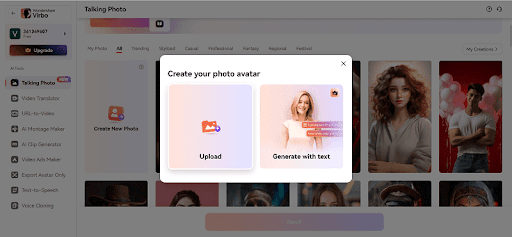
Access the AI headshot generator online and upload a clear selfie by clicking “Create New Photo” > “Upload”. Afterward, click “Next”.

STEP 2. Choose Your Style
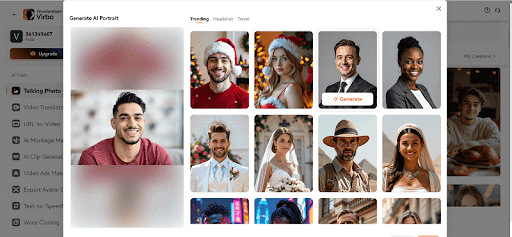
Now move your cursor onto the photo you upload and click on the “AI Portrait” icon showing up. Then in the pop-up window, select a portrait style and click on the “Generate” button to turn your selfie into that style.
STEP 3. Download Your Headshot
After the AI headshot maker finishes the transformation, click the download button at the bottom-right corner and save it to your preferred location.


Are you ready to generate realistic headshots for different scenarios in seconds? Take the hassle out of creating headshots—try Virbo AI Headshot Generator today!
FAQs About AI Headshot Generators
Q1. Can I Use the Headshots by Virbo for Professional Purposes?
Yes. The headshots are completely generated by Virbo’s AI engine. All of them are copyright-free. So you don’t need to worry about the copyright issues. Feel free to use them on LinkedIn, Upwork, resumes, and other professional scenarios.
Q2. How Do I Ensure the Quality of My Headshots?
For high-quality output of headshots, all you need to do is upload a clear selfie of yourself. The higher the resolution is, the better. Besides, you should ensure your head is front-facing instead of heavily angled, as an angled face may result in distorted headshots.
Conclusion
AI headshot generators unlock a world of possibilities when it comes to curating the perfect portrait for your needs. This blog has listed several top AI tools that transport you into a vast range of professional environments and eliminate costly and time-consuming photo shoot sessions.
But if you want the best AI headshot generator out of all, then Virbo AI Headshot Generator will surely stand out. It produces higher-quality outputs in a shorter time and with more budget-friendly plans. Also, there are plenty of templates to pick from, and no learning necessary. Create your professional headshot today with Virbo AI Headshot Generator – effortless and stunning.